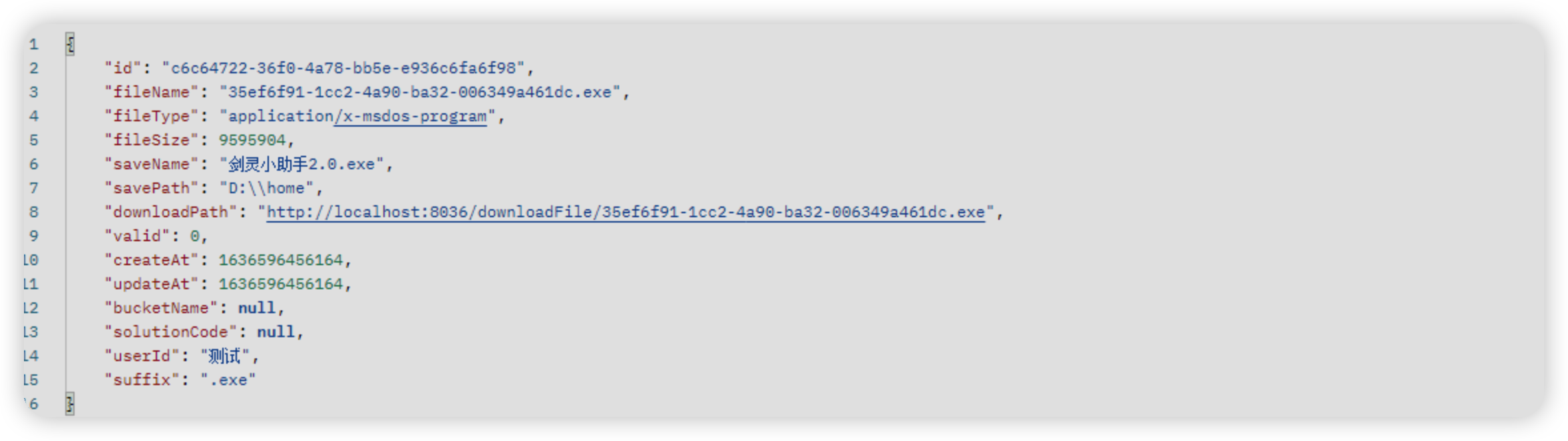
本文仅展示了部分文件
# 一、搭建 SpringBoot 开发环境# 1. 创建项目(略)# 2. 配置 application.yml 参数1 2 3 4 5 6 7 8 9 10 11 12 13 14 15 16 17 18 19 20 21 22 23 24 server: port: 8036 spring: datasource: username: **** password: **** url: **** driver-class-name: com.mysql.cj.jdbc.Driver type: com.mysql.cj.jdbc.MysqlConnectionPoolDataSource application: name: hospital-file thymeleaf: cache: false servlet: multipart: enabled: true max-file-size: 500MB file-size-threshold: 2KB max-request-size: 1024MB mybatis-plus: mapper-locations: classpath*:mybatis/*.xml file: locations: D:/home/
其中file.upload.path =D:/aplus参数为自定义的参数,有两种方式可以获取到此参数
使用 @Value ("${file.upload.path}")
使配置参数可以自动绑定到 POJO 类。
使配置参数绑定实体类详细代码如下:
1 2 3 4 5 6 7 8 9 10 11 12 13 14 15 16 17 18 19 @ConfigurationProperties(prefix = "file") public class FileProperty { private String filePath; public String getFilePath () { return filePath; } public void setFilePath (String filePath) { this .filePath = filePath; } }
必须在@SpringbootUploadApplication注解的类中添加@EnableConfigurationProperties注解以开启ConfigurationProperties功能
1 2 3 4 5 6 7 8 9 10 11 12 @EnableConfigurationProperties({ FileProperty.class }) @SpringBootApplication public class FileApplication { public static void main (String[] args) { SpringApplication.run(FileApplication.class, args); } }
# 3. 实体响应类和异常信息类文件成功后需要有的响应实体类UploadFileResponse和文件出现上传异常类FileException来处理异常信息
1 2 3 4 5 6 7 8 9 10 11 12 13 14 15 16 17 18 19 20 21 22 23 24 25 26 27 28 29 30 31 32 33 34 35 36 37 38 39 40 41 42 43 44 45 46 47 48 49 50 51 52 53 54 55 56 57 58 59 60 61 62 63 64 65 66 67 68 69 70 71 72 73 74 75 76 77 78 79 80 81 82 83 84 85 86 87 88 89 90 91 92 93 94 95 96 97 98 99 100 101 102 103 104 105 106 107 108 109 110 111 112 113 114 115 116 117 118 119 120 121 122 123 124 125 126 127 128 129 130 131 132 133 134 135 136 137 138 139 140 141 142 143 144 145 146 147 148 149 150 151 152 153 154 155 156 157 158 159 160 161 162 163 164 @ApiModel(value="文件管理表") @Data @Builder @AllArgsConstructor @NoArgsConstructor @TableName(value = "sys_file") public class SysFileDto implements Serializable { @TableId(value = "id", type = IdType.INPUT) @ApiModelProperty(value="主键id") private String id; @TableField(value = "file_name") @ApiModelProperty(value="文件名称") private String fileName; @TableField(value = "file_type") @ApiModelProperty(value="文件类型") private String fileType; @TableField(value = "file_size") @ApiModelProperty(value="文件大小") private Long fileSize; @TableField(value = "save_name") @ApiModelProperty(value="保存名称") private String saveName; @TableField(value = "save_path") @ApiModelProperty(value="保存路径") private String savePath; @TableField(value = "download_path") @ApiModelProperty(value="下载路径") private String downloadPath; @TableField(value = "`valid`") @ApiModelProperty(value="删除标识") private Integer valid; @TableField(value = "create_at") @ApiModelProperty(value="创建时间") private Long createAt; @TableField(value = "update_at") @ApiModelProperty(value="修改时间") private Long updateAt; @TableField(value = "bucket_name") @ApiModelProperty(value="容器名称") private String bucketName; @TableField(value = "solution_code") @ApiModelProperty(value="用户所属系统") private String solutionCode; @TableField(value = "user_id") @ApiModelProperty(value="用户id") private String userId; @TableField(value = "suffix") @ApiModelProperty(value="文件后缀") private String suffix; public SysFileDto (String fileName, String downloadPath, String fileType, long fileSize, String suffix,String userId,String solutionCode, Long updateAt,Long createAt,Integer valid,String savePath,String saveName,String id) { this .fileName = fileName; this .userId = userId; this .solutionCode = solutionCode; this .updateAt = updateAt; this .createAt = createAt; this .valid = valid; this .savePath = savePath; this .id = id; this .saveName = saveName; this .suffix = suffix; this .downloadPath = downloadPath; this .fileType = fileType; this .fileSize = fileSize; } public SysFileDto (String fileName, String downloadPath, String fileType, long fileSize) { this .fileName = fileName; this .downloadPath = downloadPath; this .fileType = fileType; this .fileSize = fileSize; } private static final long serialVersionUID = 1L ; public static final String COL_ID = "id" ; public static final String COL_FILE_NAME = "file_name" ; public static final String COL_FILE_TYPE = "file_type" ; public static final String COL_FILE_SIZE = "file_size" ; public static final String COL_SAVE_NAME = "save_name" ; public static final String COL_SAVE_PATH = "save_path" ; public static final String COL_DOWNLOAD_PATH = "download_path" ; public static final String COL_VALID = "valid" ; public static final String COL_CREATE_AT = "create_at" ; public static final String COL_UPDATE_AT = "update_at" ; public static final String COL_BUCKET_NAME = "bucket_name" ; public static final String COL_SOLUTION_CODE = "solution_code" ; public static final String COL_USER_ID = "user_id" ; public static final String COL_SUFFIX = "suffix" ; }
异常信息处理类
1 2 3 4 5 6 7 8 9 10 11 12 13 14 15 public class FileException extends RuntimeException { public FileException (String message) { super (message); } public FileException (String message, Throwable cause) { super (message, cause); } }
# 4. 创建 FileController1 2 3 4 5 6 7 8 9 10 11 12 13 14 15 16 17 18 19 20 21 22 23 24 25 26 27 28 29 30 31 32 33 34 35 36 37 38 39 40 41 42 43 44 45 46 47 48 49 50 @RestController @Component @Api(tags = "文件管理") public class FileController { @Autowired private FileService fileService; @PostMapping("/uploadFile") public SysFileDto uploadFile (@RequestParam("file") MultipartFile file) { return fileService.uploadFile(file); } @PostMapping("/uploadMultipleFiles") public List<SysFileDto> uploadMultipleFiles (@RequestParam("files") MultipartFile[] files) { return fileService.uploadMultiple(files); } @GetMapping("/downloadFile/{fileName:.*}") public ResponseEntity<Resource> downloadFile (@PathVariable String fileName, HttpServletRequest request) { return fileService.download(fileName, request); } }
FileService实现类
1 2 3 4 5 6 7 8 9 10 11 12 13 14 15 16 17 18 19 20 21 22 23 24 25 26 27 28 29 30 31 32 33 34 35 36 37 38 39 40 41 42 43 44 45 46 47 48 49 50 51 52 53 54 55 56 57 58 59 60 61 62 63 64 65 66 67 68 69 70 71 72 73 74 75 76 77 78 79 80 81 82 83 84 85 86 87 88 89 90 91 92 93 94 95 96 97 98 99 100 101 102 103 104 105 106 107 108 109 110 111 112 113 114 115 116 117 118 119 120 121 122 123 124 125 126 127 128 129 130 131 132 133 134 135 136 137 138 139 140 141 142 143 @Service @Component public class FileServiceImpl extends ServiceImpl <FileMapper, SysFileDto> implements FileService { private static final Logger logger = LoggerFactory.getLogger(FileServiceImpl.class); private Path fileStorageLocation; @Autowired FileMapper fileMapper; public FileServiceImpl ( @Value("${file.locations}") String path) { this .fileStorageLocation = Paths.get(path).toAbsolutePath().normalize(); try { Files.createDirectories(this .fileStorageLocation); } catch (IOException e) { throw new FileException ("Could not create the directory" , e); } } @Override public String storeFile (MultipartFile file) { String fileName = UUID.randomUUID().toString()+file.getOriginalFilename().substring(file.getOriginalFilename().lastIndexOf("." ),file.getOriginalFilename().length()); try { if (fileName.contains(".." )) { throw new FileException ("Sorry! Filename contains invalid path sequence " + fileName); } Path targetLocation = this .fileStorageLocation.resolve(fileName); Files.copy(file.getInputStream(), targetLocation, StandardCopyOption.REPLACE_EXISTING); return fileName; } catch (IOException ex) { throw new FileException ("Could not store file " + fileName + ". Please try again!" , ex); } } @Override public Resource loadFileAsResource (String fileName) { try { Path filePath = this .fileStorageLocation.resolve(fileName).normalize(); Resource resource = new UrlResource (filePath.toUri()); if (resource.exists()) { return resource; } else { throw new FileException ("File not found " + fileName); } } catch (MalformedURLException ex) { throw new FileException ("File not found " + fileName, ex); } } @Override public SysFileDto uploadFile (MultipartFile file) { String fileName = this .storeFile(file); String fileDownloadUri = ServletUriComponentsBuilder.fromCurrentContextPath() .path("/downloadFile/" ) .path(fileName) .toUriString(); SysFileDto sysFileDto = new SysFileDto (); sysFileDto.setFileSize(file.getSize()); sysFileDto.setFileName(fileName); sysFileDto.setFileType(file.getContentType()); sysFileDto.setDownloadPath(fileDownloadUri); sysFileDto.setCreateAt(System.currentTimeMillis()); sysFileDto.setUpdateAt(System.currentTimeMillis()); sysFileDto.setId(UUID.randomUUID().toString()); sysFileDto.setSaveName(file.getOriginalFilename().replace(" " ,"" )); sysFileDto.setUserId("测试" ); sysFileDto.setSavePath(fileStorageLocation.toFile().getPath()); sysFileDto.setValid(0 ); sysFileDto.setSuffix(file.getOriginalFilename().substring(file.getOriginalFilename().lastIndexOf("." ),file.getOriginalFilename().length())); this .save(sysFileDto); return sysFileDto; } @Override public List<SysFileDto> uploadMultiple (MultipartFile[] files) { List<SysFileDto> list = new ArrayList <>(); if (files != null ) { for (MultipartFile multipartFile:files) { SysFileDto uploadFileResponse = uploadFile(multipartFile); list.add(uploadFileResponse); } } return list; } @Override public ResponseEntity<Resource> download (String fileName, HttpServletRequest request) { Resource resource = this .loadFileAsResource(fileName); String contentType = null ; try { request.getServletContext().getMimeType(resource.getFile().getAbsolutePath()); } catch (IOException e) { logger.info("Could not determine file type." ); } if (contentType == null ) { contentType = "application/octet-stream" ; } List<String> saveName = fileMapper.findSaveNameByFileName(fileName); String name = saveName.get(0 ); try { name = URLEncoder.encode(name,"UTF-8" ); }catch (UnsupportedEncodingException e){ logger.info("文件名转换异常" ); e.printStackTrace(); } return ResponseEntity.ok() .contentType(MediaType.parseMediaType(contentType)) .header(HttpHeaders.CONTENT_DISPOSITION, "attachment; filename=\"" +name+ "\"" ) .body(resource); } }
需要注意的是,文件名称中文乱码的问题。这里使用了 URLEncoder.encode();
文件名使用 uuid 生成储存。下载时替换为原文件名下载。
mapper文件(只是为了查询文件名称)
1 2 3 4 5 6 7 8 9 10 11 12 13 14 15 16 17 18 19 20 21 22 23 24 25 26 27 28 29 30 31 32 33 34 35 36 37 38 39 40 41 42 <?xml version="1.0" encoding="UTF-8" ?> <!DOCTYPE mapper PUBLIC "-//mybatis.org//DTD Mapper 3.0//EN" "http://mybatis.org/dtd/mybatis-3-mapper.dtd" > <mapper namespace ="com.hostpital.file.mapper.FileMapper" > <resultMap id ="BaseResultMap" type ="com.hostpital.file.vo.SysFileVo" > <result column ="id" property ="id" /> <result column ="file_name" property ="fileName" /> <result column ="file_type" property ="fileType" /> <result column ="file_size" property ="fileSize" /> <result column ="save_name" property ="saveName" /> <result column ="save_path" property ="savePath" /> <result column ="download_path" property ="downloadPath" /> <result column ="valid" property ="valid" /> <result column ="create_at" property ="createAt" /> <result column ="update_at" property ="updateAt" /> <result column ="bucket_name" property ="bucketName" /> <result column ="solution_code" property ="solutionCode" /> <result column ="user_id" property ="userId" /> <result column ="suffix" property ="suffix" /> </resultMap > <sql id ="Base_Column_List" > id, file_name, file_type, file_size, save_name, save_path, download_path, `valid`, create_at, update_at, bucket_name, solution_code, user_id, suffix </sql > <select id ="findSaveNameByFileName" resultType ="java.lang.String" > select save_name from sys_file where file_name=#{fileName} </select > </mapper >
# 二、接口测试